Load Balancing allows you to define multiple backends with which to receive the traffic directed at your X4B Service. Load Balancing is supported for both the Layer 4 (TCP/UDP) and Layer 7 (HTTP/HTTPS).
Configure backend servers
- Open Services, choose the service's Action → Ports, then the port's Action → Load Balance. The configuration opens in a new tab.
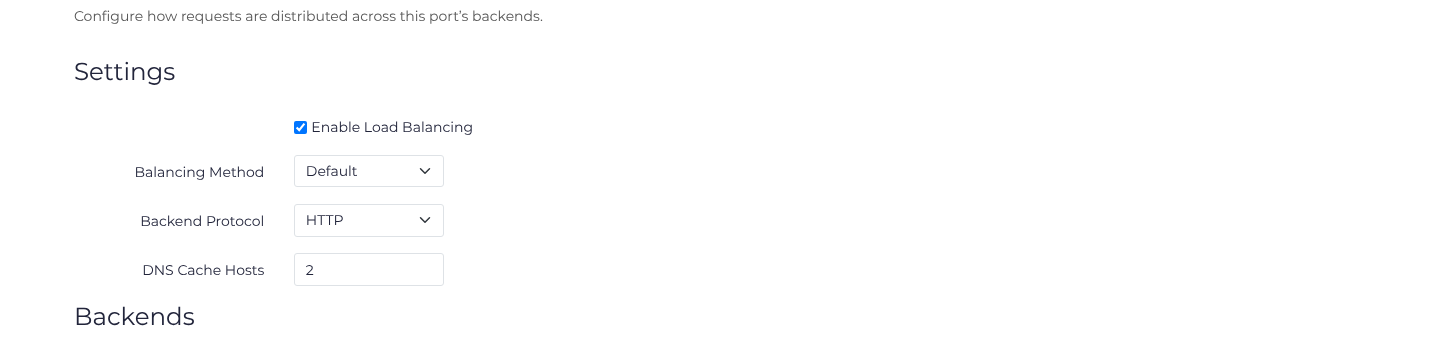
- Select Enable Load Balancing. For HTTP/HTTPS, choose the Balancing Method, a common Backend Protocol, and DNS Cache Hosts when using hostname backends.
- Review the existing backend row, then choose Add Backend for each additional independent origin. Enter its address and port, and Save. For example, use primary
200.1.1.1:80and backup200.1.1.2:80with Default balancing, weight1, Number of Failures3, and Failure Timeout30seconds. Replace these example addresses with your origins. - Reload and check both saved rows. Verify that each origin accepts X4B traffic and serves the intended application. Saving the pool does not establish origin reachability or prove failover.
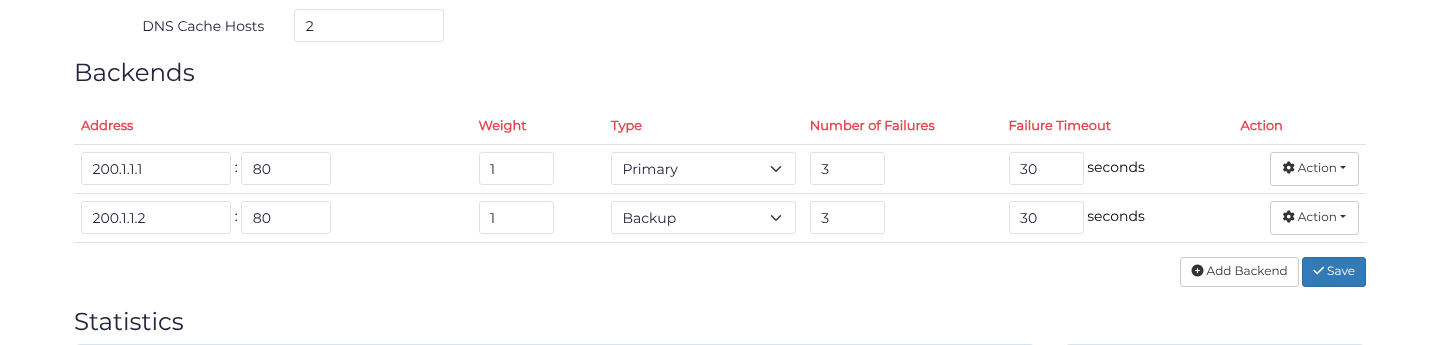
Changing a backend row requires Save. Its Action menu can reorder or delete it. Disabling load balancing returns the port to its simple backend configuration; check that destination in Ports before relying on it.
Load Balancing at Layer 7
Several methods are available for balancing connections to HTTP(s) services. All defined backends must be either HTTP or HTTPS.
Balancing methods
| Method | How connections are distributed |
|---|---|
| Default | Weighted round-robin distribution |
| IP Hash | Attempts to route each client to a consistent server based on its IP address |
| Least Connections | Routes the client to the server with the fewest active connections |
DNS
A hostname backend can expand into several upstream addresses. DNS Cache Hosts limits the resolved addresses used for each hostname. The supported Dashboard range is 0 to 4. This setting controls an address count; DNS answer caching and refresh timing are separate.
| Configuration | Effect of DNS Cache Hosts |
|---|---|
| Simple hostname backend, value 0 | Uses cached DNS answers; opens a new backend connection per request |
| Simple hostname backend, value 1–4 | Uses up to that many addresses; supports keepalive |
| Load-balancing mode, value 0 | Uses one address per hostname; supports keepalive |
| Load-balancing mode, value 1–4 | Uses up to that many addresses per hostname; supports keepalive |
Resolved addresses use the selected balancing method. For redundancy, use independent backend servers.
Refresh and keepalive
Addresses in the pool refresh in the background. Hostname backends currently resolve to IPv4 addresses, with DNS answers cached for five minutes. Allow for this cache lifetime when changing addresses.
Enable backend keepalive to reuse connections in an upstream pool. DNS refreshes update the available addresses while existing requests finish.
Initial lookup and DNS failures
The first request may be delayed while the backend hostname resolves. If no backend address becomes available in time, the request fails.
After a successful lookup, temporary DNS failures can leave previous addresses available while resolution is retried. A response saying the hostname does not exist (NXDOMAIN) removes the addresses for that hostname. Other configured backends may remain usable; if none can serve the request, the request fails.
See HTTP DNS backends for frontend/backend protocol distinctions and the NGINX upstream reference for balancing qualifications. Backup peers are incompatible with IP Hash; use a compatible method when configuring backups.
Options
| Option | Effect |
|---|---|
| Weight | Where supported by the balancing method, higher values send more requests to this backend |
| Number of failures & Failure Timeout | Temporarily removes a backend from the pool after the configured number of failures |
| Type | Uses backup backends when primary backends are offline |
Statistics
Statistics are provided in regard to the distribution of requests between backends in total and for a 30 day period.
Load Balancing at Layer 4
Sessions are balanced in a round-robin manner with best effort fairness. In the context of TCP one session is one connection. In the context of UDP one session is one unique tuple (srcip,srcport,dstip,dstport) in this way it is much the same as TCP connection.
Layer 4 round-robin distribution does not provide the HTTP pool's failure-count and backup-server controls. For tunnel failover, see BGP tunnels.