Open Services, choose the service's Action → Ports, then the HTTP/HTTPS port's Action → HTTP Options. Change only settings your application needs, choose Set, reload, and confirm the saved values. These controls affect forwarding to your origin; test the website after deployment.
Backend connections
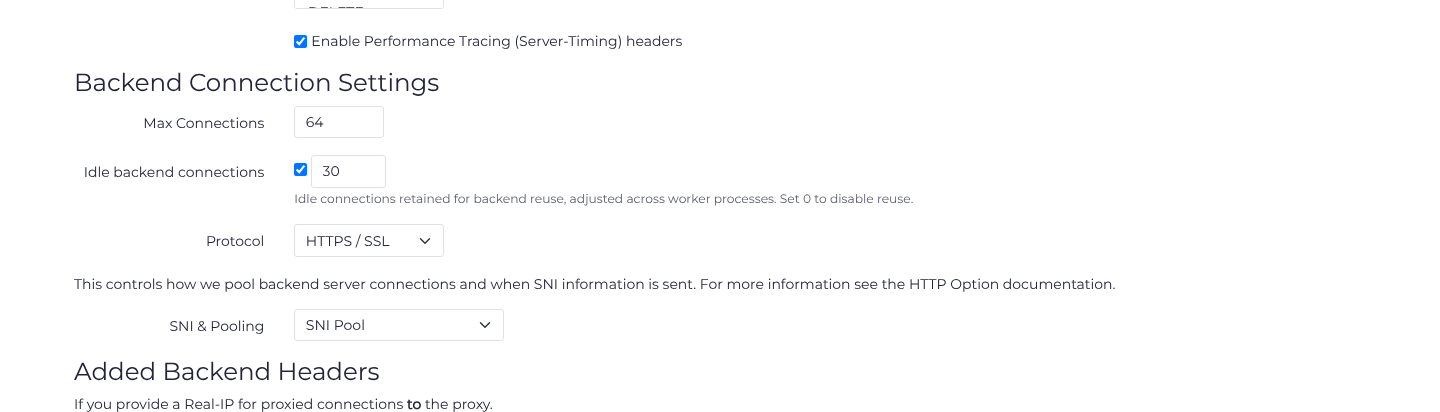
Max Connections limits backend connections for this port; it is separate from the per-client concurrency limit in Rate Limiting. Idle backend connections (keepalive) sets the number of idle connections retained for backend reuse. The connection-pool size is adjusted across worker processes. A value of 0 disables reuse. This connection count is separate from connection timeouts and the active-connection limit.
Set Protocol to what your origin accepts. For an HTTPS origin, HTTPS / SSL with SNI Pool is the compatible choice when the origin requires the request hostname to match TLS SNI. For example, a limit of 64 backend connections and 30 idle backend connections must still fit your origin's capacity. The idle-connection count does not configure a timeout.
Allowed Methods
The list of methods that will be forwarded to the backend server. Reasonable defaults have been provided for you.
Choose only methods your application needs. Preserve OPTIONS when required for CORS preflight. Available methods are:
- GET
- POST
- HEAD
- PUT
- DELETE
- OPTIONS
- PATCH
Backend SNI & Pooling
If your backend server is using HTTPS you may need to configure the Backend SNI option in the HTTP Options section of the port configuration. This is required if your backend server uses SNI to determine which certificate to present (for example if you are hosting multiple HTTPS websites on a single IP address). If your backend server does not validate Host name headers and their match to SNI names then you can disable this for a slight performance increase for services with many domain/subdomain names on a single backend.
Our default is to enable this option for compatibility with Apache 2 (for more information see the Website Setup page) which as of version 2.4.65+ enforces SNI matching on HTTPS connections.
The modes available for this setting are:
- Disabled: Do not send SNI information to the backend server. This is the default for HTTP (only) backends.
- Send SNI (HTTPS backend only): Send SNI information matching the Host header to the backend server but allow future requests to any domain name configured on the port to be sent to the backend server. This is useful if your webserver validates on the first request to match the SNI name to the Host header but you have many domain names on a single backend IP as it allows your pool of backend connections to be reused for all domain names.
- SNI Pool/Pool: Send SNI information matching the Host header to the backend server and only allow future requests to the same domain name to be sent to the backend server over that connection. This is useful if your webserver validates on every request to match the SNI name to the Host header but you have many domain names on a single backend IP as it allows your pool of backend connections to be reused for all domain names. This is the default for HTTPS backends and required for Apache 2.4.65+ compatibility.
On HTTP backends a "Pool" mode which can optionally be enabled for a similar Host based pooling effect. But this is not required for compatibility with any known common web server. In the case of that configuration connections (keepalive) will be reused only for requests to the same Host header (the same as SNI Pool, but without SNI). This is not recommended unless you have a specific need for it as it reduces the effectiveness of connection reuse.
Real IP Headers
A Real IP Header (aka Forwarded-For header) allows for upstream proxies to send along the IP address of connecting clients to the next service in line. In this case this option is provided to allow for a situation where we are used in the middle.
Note: this does not exempt the connecting host from any DDoS protection rules and is generally not a recommended configuration.
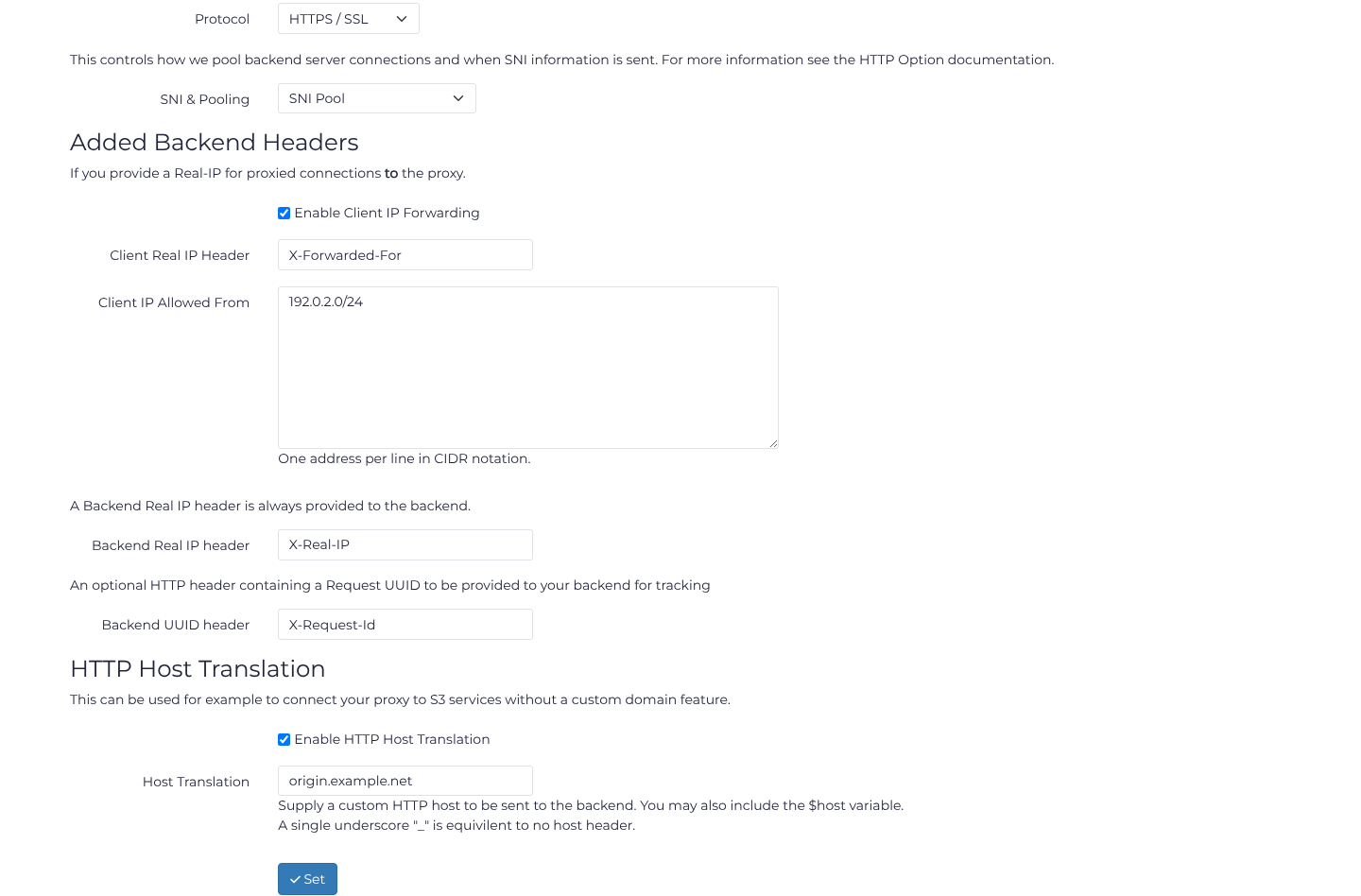
Enable Client IP Forwarding only for an upstream proxy you control or trust. Enter its Client Real IP Header and list its source networks in Client IP Allowed From, one CIDR per line. Do not trust all addresses: an untrusted client could supply a forged header. 192.0.2.0/24 below represents an example upstream network, not a value to copy into production.
Backend Real IP header controls the header sent onward to your origin and defaults to X-Real-IP. Configure your origin to trust this header only from X4B's backend communication addresses.
UUID Header
Every request (successful or an error) is assigned a request UUID internally, regardless of the UUID Header setting. This UUID is shown on non customised error pages (for more information see the Error Pages documentation) and can be used to identify a specific request. The UUID Header option additionally sends this UUID to the backend server using a header name you choose. This configurable header is disabled by default on a new port.
If enabled with the header of X-Request-Id you should expect to see a request similar to the following made to your backend server:
GET / HTTP/1.1
Accept-Encoding: deflate,gzip
Host: [...]
X-Real-IP: [...]
X-Scheme: https
X-Source: TEST_LAX1
X-Request-Id: 45dd4b87-7722-85b5-080b-8ac5080b235a
[...]
Host Translation
An option is provided that allows you to specify a custom HTTP host to be sent to the backend server different to what the client provides. This custom hostname can also include the $host variable. This configuration is especially useful for white-labeling software and allowing for dynamic configurations of domains that the backend software may not easily provide.
Example configurations:
$host: This is the default configuration. There is no need to change or enable the setting for this.$host.domain.com: the connecting domain name would be provided as a subdomain to your supplied domain name suffix.origin.example.net: Always send this hostname to the backend, regardless of the received Host header._: A single underscore denotes a special mode where no HTTP header will be sent.
Performance Tracing headers
Experiencing slower performance of your website than expected? Want data on how fast your backend server responds to requests? Performance Tracing (Server-Timing) headers can do this. Performance tracing headers are sent on all requests served by your backend when enabled and are disabled by default.
NOTE: Performance tracing headers should only be enabled if required as they do slightly reduce the performance of the page and size of the request.
When enabled using Chrome Developer tools you can retrieve metrics on:
- The time it takes for a connection to your backend to be made (0ms if a pooled keepalive connection is used) accurate to within +/- 10ms. This includes TLS negotiation time and any DNS lookups as necessary.
- The time it takes for the response headers to be generated and then received from your backend (accurate to within +/- 10ms)
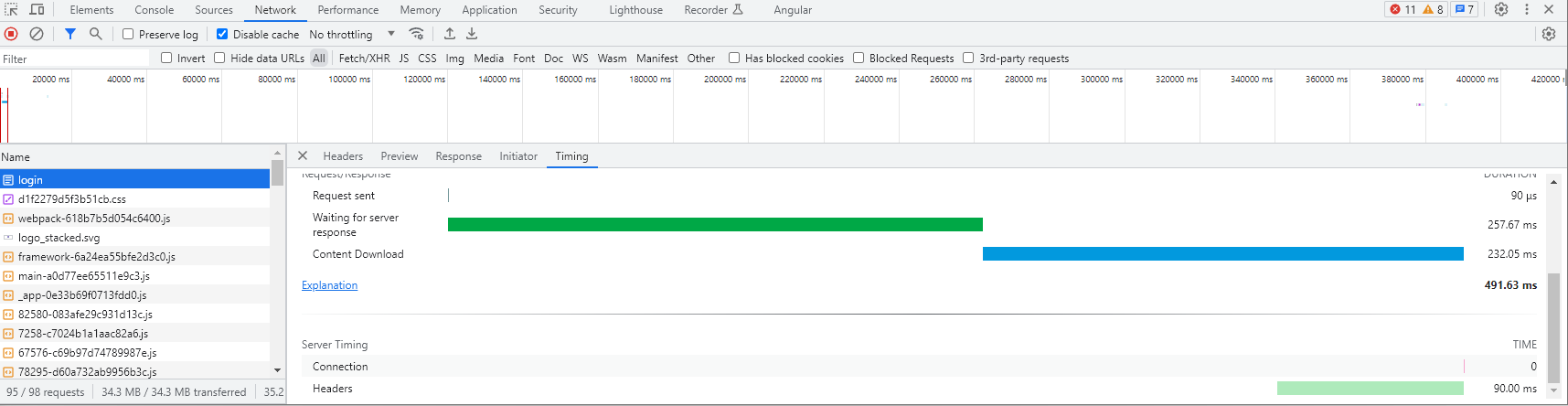
If multiple backends are used to serve a single request (such as if a backend is down) only the timing for the first backend is reported.
If you are troubleshooting an issue relating to performance you also might want to:
- Check caching settings if migrating from another proxy / web accelerator, we are conservative by default and place control in the hands of you (the customer).
- Check error log for any issues connecting to your backend, or with your configuration (such as ratelimits).
- Check routes both to/from your server and the backend communication IP and between your clients and our network
- Check the content of the page being served for any issues that may be causing the page to load slowly, there is only so much caching and acceleration can do to speed up a poorly developed site / page.
Other Headers
By default we send a number of headers to the backend server. These headers are used to identify the request and provide information to the backend server. These headers are:
X-Source: The datacenter the request was received in.X-Scheme: The scheme of the request (http or https).X-Real-IP: The IP address of the client that connected to our network.X-X4B-Request: The request UUID used by X4B.
An additional header such as X-Request-Id is sent only when you enable UUID Header and configure that name. It carries the same request UUID for tracing / logging purposes and is disabled by default.